November 5, 2026 · Kollavo Team
AI Prompt Tracking: How to Track Prompts in ChatGPT, Gemini and Google AI (2026)
AI prompt tracking explained: how to pick 25 to 100 buyer prompts, which engines to track, why every prompt needs 3+ runs (83% of URLs ChatGPT cited in our panel appeared in only 1 of 3 runs), what to report, and 8 prompt tracking tools compared by price, prompts and refresh rate.
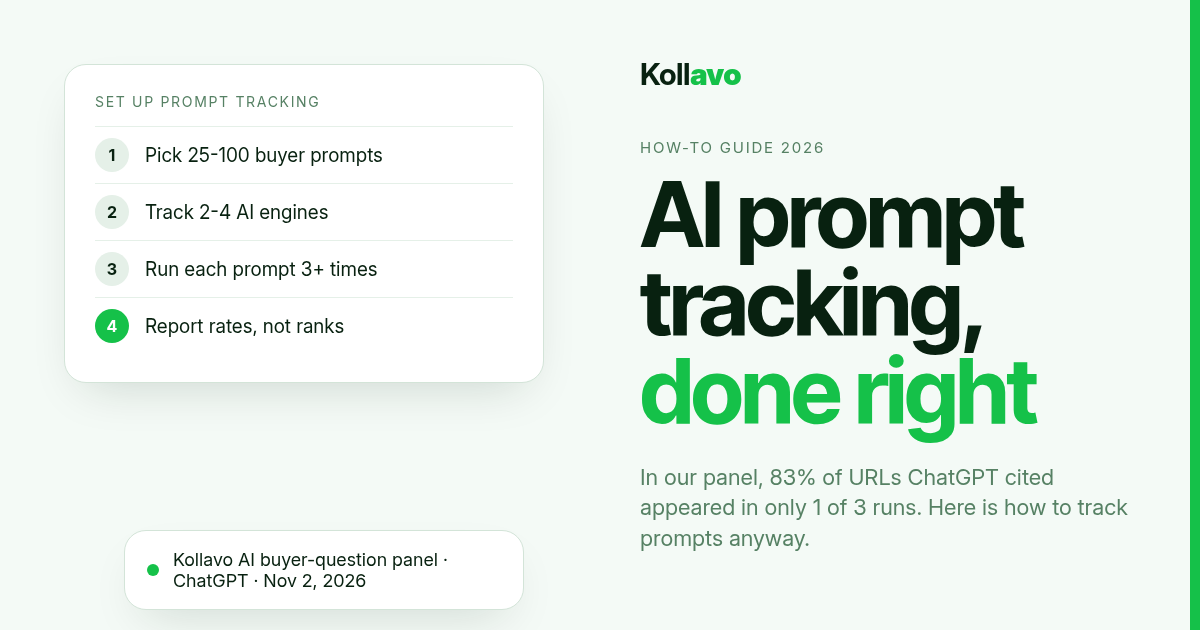
Short answer: AI prompt tracking means running a fixed list of buyer questions through ChatGPT, Gemini, Google AI Overviews, AI Mode and other engines on a schedule, and logging which brands each answer names and which URLs it cites. To do it well: pick 25 to 100 prompts from real buyer questions, track the 2 to 4 engines your buyers use, run every prompt more than once per check, and report mention rate and citation rate over time instead of a single "rank". Prompt tracking tools such as Semrush, Otterly.AI, Peec AI, LLMrefs, Scrunch, Profound and Kollavo do this for you, starting at $29 to $99 a month. The one rule that matters most: AI answers change from run to run, so one answer per prompt is not a measurement.
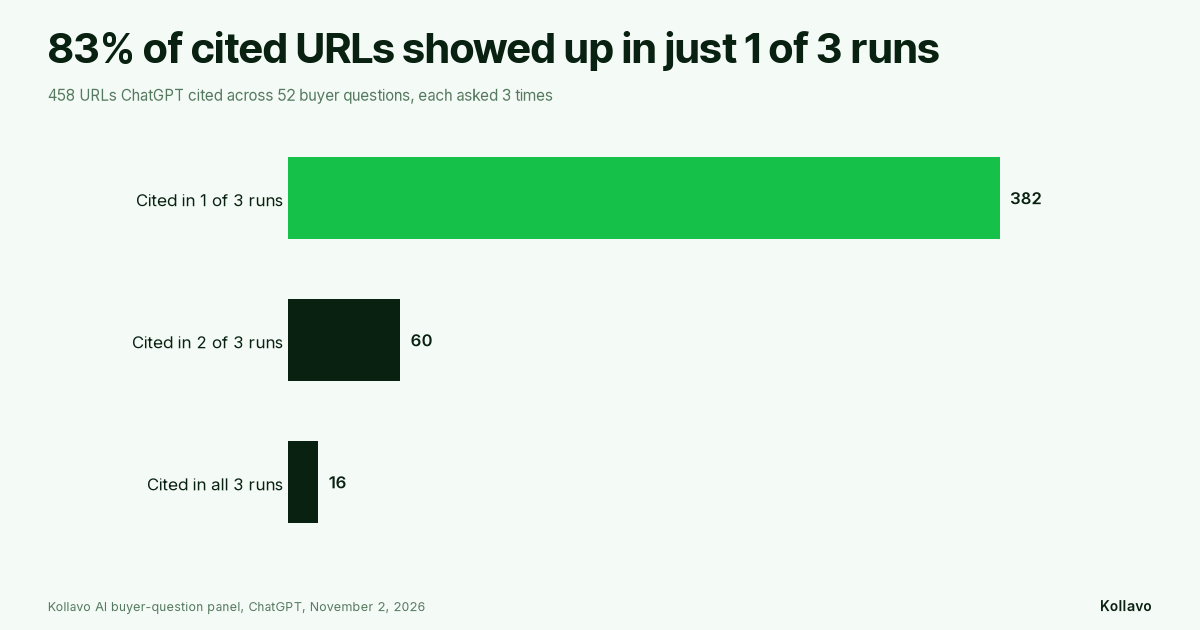
That last point is not a theory. In Kollavo's weekly panel of 52 buyer questions about AI visibility tools, each run 3 times in ChatGPT on November 2, 2026, 83% of the cited URLs showed up in only one of the three runs. Only 3% were cited in all three. This guide explains how to set up prompt tracking so numbers like that work for you, not against you. For the one-line definition, see our glossary entry on prompt tracking.
What a prompt tracker records
A prompt is the question a buyer types into an AI assistant, such as "best payroll software for a 40-person agency". A prompt tracker sends that question to one or more AI engines on a schedule and stores what comes back. For every answer, a useful log has:
| Field | Example | Why you need it |
|---|---|---|
| Prompt and intent | "Profound vs Otterly" (comparison) | Lets you group results by buying stage |
| Engine and date | ChatGPT, November 2, 2026 | Answers differ by engine and over time |
| Run number | Run 2 of 3 | Separates noise from real change |
| Brands mentioned | Semrush, Profound, Otterly.AI | Feeds mention rate and share of voice |
| URLs cited | semrush.com/kb/1503-prompt-tracking | Shows which sources you need to be on |
| Your brand mentioned / cited | Mentioned: no. Cited: no | Your core visibility signal |
| Sentiment or position (optional) | Named second, neutral | Context only; position is unstable |
Semrush describes its own Prompt Tracking the same way: daily checks of a custom prompt set in ChatGPT Search, Google AI Mode and Gemini, reporting visibility, mentions and average position, plus the domains and pages each engine cites.
Prompt tracking is wider than citation tracking. Citation tracking only follows the linked sources. Prompt tracking also covers the brands an answer names without a link, which is often the part buyers read. If citations are your main focus, our guide to LLM citation tracking goes deeper on that side.
Why one answer per prompt is not enough
Most teams start by typing their top questions into ChatGPT and writing down what they see. It is not tracking: the same question gives a different answer minutes later.
Here is what we saw when we asked ChatGPT the same 52 buyer questions 3 times each (156 answers, November 2, 2026):
| What we compared across the 3 runs | Result |
|---|---|
| Questions where all 3 runs named exactly the same brands | 24 of 52 (46%) |
| Questions where all 3 runs cited exactly the same domains | 4 of 52 (8%) |
| Brand appearances that happened in only 1 of 3 runs | 79 of 181 (44%) |
| Cited URLs that appeared in only 1 of 3 runs | 382 of 458 (83%) |
| Cited URLs that appeared in all 3 runs | 16 of 458 (3%) |
Brands were steadier than sources. Semrush, the most-named tool in the panel, appeared in at least one run for 25 of the 52 questions, but in all three runs for only 11. If you had checked once, you could have counted Semrush present or absent on 14 of those questions purely by chance.
Independent research points the same way. SparkToro and Gumshoe had 600 volunteers run 12 prompts through ChatGPT, Claude and Google's AI a combined 2,961 times, and found less than a 1 in 100 chance of getting the same list of brands twice, and about 1 in 1,000 for the same list in the same order. Their conclusion is the useful part: ranking position in an AI answer is close to meaningless, but visibility percentage across many prompts and many runs is a reasonable metric.
So the job of a prompt tracker is not to tell you "where you rank in ChatGPT". It is to estimate how often you show up, and whether that number is moving. We cover the week-to-week side of this in AI citation volatility, and the slower kind of drop in citation decay.
How to set up AI prompt tracking in 6 steps
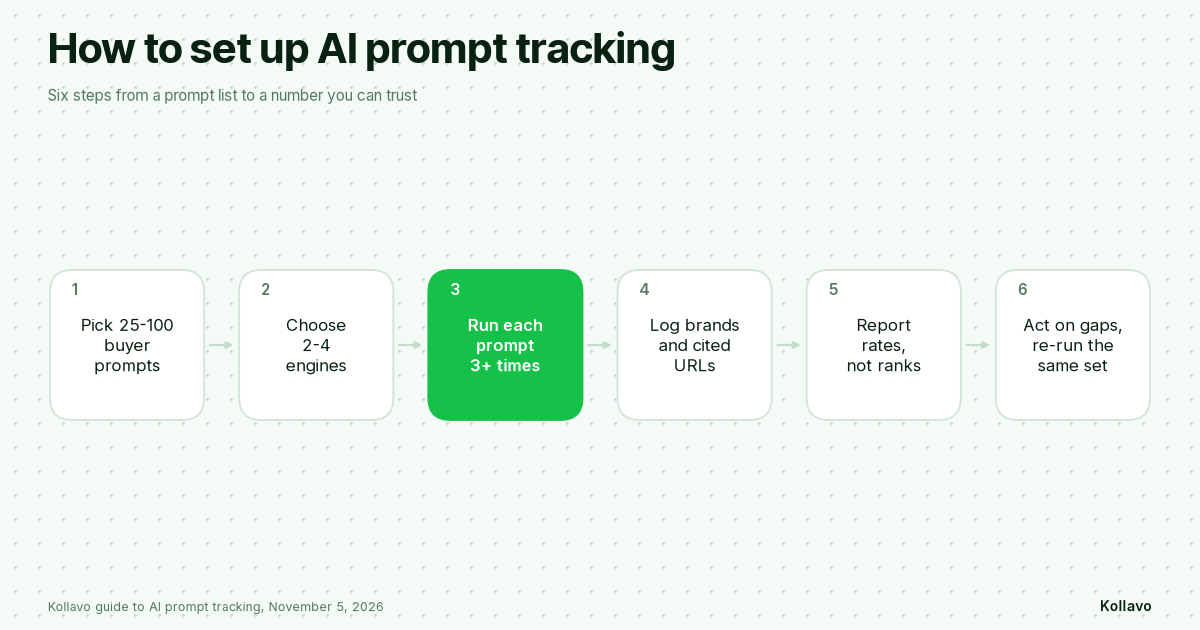
1. Build the prompt set from real buyer questions
Start with the questions you hear in sales calls, support tickets, demos and community threads. Cover the whole buying journey:
- Category: "best [category] software for [audience]"
- Comparison: "[you] vs [competitor]", "[competitor] alternatives"
- Problem: "how do I [job your product does]"
- Validation: "is [competitor] worth it", "[category] pricing"
Write prompts the way people ask AI, as full questions with context, not as two-word keywords. SparkToro found that 142 people asked about the same need in very different words (an average semantic similarity of 0.081), so include a few phrasings of each important question rather than one "perfect" prompt. The free AI prompt generator suggests buyer-intent prompts to start from, and the query fan-out tool shows the sub-questions an engine may search behind each one.
How many prompts? Most teams land between 25 and 100. Fewer than 25 and one odd answer swings your averages. Record why each prompt is on the list, and keep the list stable so this month compares with last month. Our glossary note on prompt volume explains why AI chats do not publish a reliable search-volume figure for prompts.
2. Choose the engines your buyers use
ChatGPT, Gemini, Google AI Overviews and Google AI Mode cover most B2B and consumer research today. Add Perplexity, Claude or Microsoft Copilot if your audience uses them. Check which engines a plan actually includes: some trackers include ChatGPT but sell Google AI Mode or Gemini as add-ons.
3. Run each prompt more than once
Three runs per prompt per check is a practical minimum. It is what our panel uses, and it is enough to separate "usually there" from "showed up once". If a decision depends on one prompt, run it more often. Daily tracking on a tool achieves the same thing over a week: seven runs of the same prompt.
4. Log brands and cited URLs for every answer
Store the raw answer, the brands named and every cited link. The cited URLs are the most actionable part of the log, because they tell you which pages the engine trusts for that question: review sites, listicles, forums, documentation or competitor pages.
5. Report rates, not ranks
Turn the log into a few numbers you can track week over week:
- Mention rate: share of answers that name your brand.
- Citation rate: share of answers that link to your domain.
- Share of voice: your mentions as a share of all brand mentions in the set. Our guide to share of voice in AI search covers the formula.
- Gap prompts: prompts where competitors appear and you do not.
Always show the prompt count, engines and number of runs next to each chart, so a reader knows the sample. Our LLM Visibility Score rolls these into one number if you need a single headline metric.
6. Act on gaps, then re-run the same prompts
Tracking only pays off when it changes what you do. For each gap prompt, read the sources the engine cited and decide: improve your own page, earn a mention on a cited review or roundup, or wait and re-check if the answer is unstable. Then re-run the same prompts on the same engines with the same number of runs, and compare like for like.
Prompt tracking tools compared
Every tool below runs prompts for you on a schedule. They differ on how many prompts you get, how often they run, and which engines are included.
| Tool and entry plan | Price per month | Prompts included | How often | Engines on that plan |
|---|---|---|---|---|
| Otterly.AI Lite | $29 | 15 | Daily | ChatGPT, Google AI Overviews, Perplexity, Copilot (AI Mode and Gemini are add-ons) |
| Kollavo Entry | $49 | Curated buyer-intent set | Weekly score | ChatGPT, Gemini, Google AI Mode |
| Ahrefs Brand Radar custom prompts | From $50 | Package-based (5 to 20 a day included in paid Ahrefs plans) | Daily, weekly or monthly (you choose) | ChatGPT, AI Overviews, AI Mode, Gemini, Perplexity, Copilot, Claude |
| LLMrefs | $79 | 500 | Weekly reports | All engines, no add-on fees |
| Peec AI Starter | $95 | 50 | Daily | 3 models of your choice |
| Semrush AI Visibility Toolkit | $99 | 25 | Daily | ChatGPT Search, Google AI Mode, Gemini |
| Scrunch Core | $250 | 125 | Not listed | ChatGPT, Perplexity, Google AI Overviews, Copilot |
| Profound | Custom (Enterprise) | Trial: 50 a day for 7 days | Daily | Trial: ChatGPT, Gemini, Google AI Overviews; up to 9 engines on Enterprise |
Prices are monthly list prices in US dollars from each vendor's pricing page or help center, checked November 4, 2026. Some vendors show euro prices in Europe, so confirm at checkout.
A few things the table does not show:
- Extra prompts cost extra. Semrush charges $60 a month per 50 additional prompts. Otterly.AI sells packs of 100 extra prompts.
- Seats matter. Semrush needs a $99 license per extra user. Otterly.AI and Peec AI include unlimited users.
- Weekly vs daily. LLMrefs gives the most prompts for the money, but refreshes weekly. For a stable prompt set that is often fine; for launch weeks it may be too slow.
- Research data. Ahrefs Brand Radar draws on a database of 531 million prompts, and Semrush includes prompt research with topic-level volume. That helps you choose prompts, not just track them.
For a price-only ranking, see our guide to the cheapest AI visibility tools. If you are already on Semrush and weighing a move, the Semrush AI Visibility Toolkit alternatives guide compares cost per prompt, and the compare hub has tool-by-tool pages.
Where Kollavo fits
Kollavo Entry ($49/month) tracks a curated set of high-intent buyer prompts and gives you a weekly visibility score on ChatGPT, Gemini and Google AI Mode, share of voice against your competitors, citation gap alerts and email alerts when your visibility changes. Managed ($99/month) adds the part trackers leave to you: 10 to 15 directory and AI-source submissions a month, prioritized by AI-citation impact, plus a live tracker and a monthly report. See pricing for details, or start with the free AI visibility audit to see where you stand before you pay for anything.
Manual tracking vs a tool
You can track prompts by hand. It is slow, but it teaches you how answers behave.
| Manual spreadsheet | Prompt tracking tool | |
|---|---|---|
| Cost | Free, plus your time | $29 to $250+ a month at entry level |
| Practical size | 10 to 20 prompts, a few engines | 15 to 500 prompts, several engines |
| Runs | As often as you have time | Daily or weekly, automatic |
| Logged-out, clean sessions | You must remember to use them | Built in |
| Cited URL capture | Copy and paste | Automatic, with history |
| Best for | A first baseline, or a handful of critical prompts | Ongoing measurement and reporting |
If you go manual, use a logged-out or fresh browser session so your chat history does not shape answers, and paste every run into one row per answer. Ten prompts, three engines and three runs is already 90 answers per check.
Common prompt tracking mistakes
- Reading one answer as a result. Our panel shows how often a single run misleads. Run more than once.
- Reporting "position" in an AI answer. Order changes almost every time. Track how often you appear instead.
- Changing the prompt list every week. You lose the baseline. Add new prompts in batches and keep the core set fixed.
- Only tracking branded prompts. "Is [your brand] good?" tells you little. The category and comparison prompts are where buyers meet competitors.
- Tracking without acting. If nobody works on the gaps, the tool is only a thermometer.
FAQ
What is AI prompt tracking?
AI prompt tracking is the practice of running a fixed set of buyer questions through AI assistants such as ChatGPT, Gemini and Google AI Overviews on a schedule, and recording which brands each answer mentions and which sources it cites. Over time it shows how often your brand appears and whether that is rising or falling.
How many prompts should I track?
Most teams track 25 to 100 prompts drawn from real buyer questions, spread across category, comparison, problem and validation intent. Below about 25, a single unusual answer moves your averages a lot. Above a few hundred, the list is usually too big for anyone to read and act on.
How often should I run each prompt?
Run each prompt at least 3 times per check, or daily, so you can tell a steady result from a one-off. In our November 2, 2026 panel, 83% of the URLs ChatGPT cited appeared in only one of three runs, so a single check can easily miss or overstate your visibility.
What is the best prompt tracking tool?
It depends on your budget and engines. Otterly.AI Lite is the cheapest paid start at $29 a month for 15 prompts. Peec AI Starter gives 50 daily prompts for $95. LLMrefs lists 500 weekly prompts for $79. Semrush suits teams already on Semrush. Kollavo Entry ($49) adds citation gap alerts, and Managed ($99) adds monthly source submissions.
Can I track prompts in ChatGPT for free?
Yes, by hand: run your prompts in a logged-out ChatGPT session, several times each, and log brands and cited links in a spreadsheet. It works for 10 to 20 prompts. Kollavo's free AI visibility audit gives a one-off snapshot, and free tools like the prompt generator help you build the list.
Is prompt tracking the same as rank tracking?
No. Classic rank tracking reports a position for a keyword. AI answers reorder brands almost every time, so position is unreliable. Prompt tracking reports how often you are mentioned or cited across many prompts and runs, which is far more stable and closer to what buyers actually see. For the checker-vs-tracker distinction and eight tools priced, see our guide to LLM ranking checkers.